Automated case intake, from the source document to E2B(R3)
IntakeX Cloud reads an adverse event report in whatever form it arrives, builds the case, codes and assesses it, writes the narrative and produces a validated E2B(R3) message. A medical reviewer signs where your policy says so, and the case goes on to your safety database.
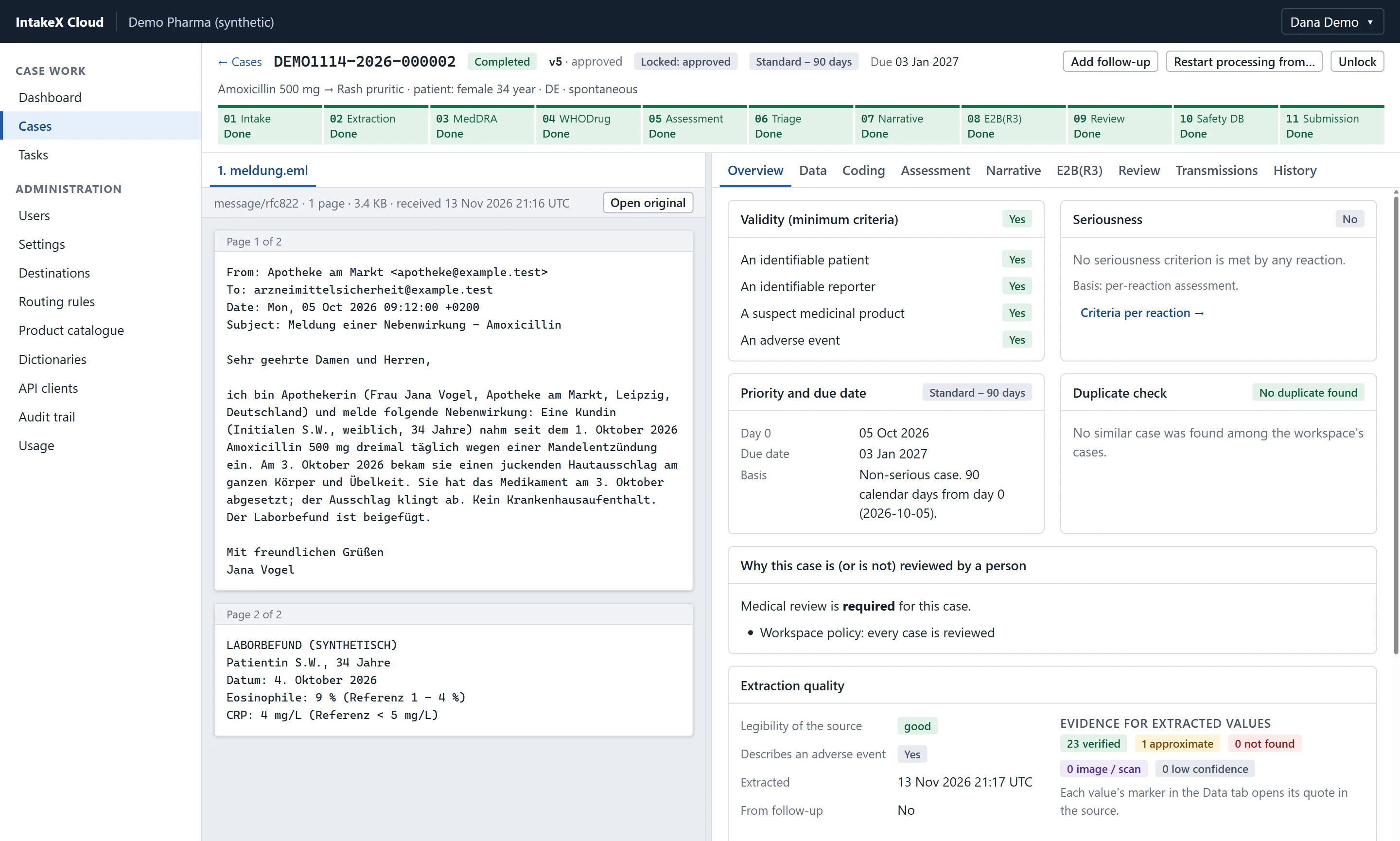
The case page: the source on the left, the case it became on the right (synthetic demonstration data).
What goes in
CIOMS and MedWatch forms, call-centre notes, medical records, discharge letters
E-mails with attachments, spreadsheets, literature articles, E2B XML
Scans, faxes and photographs of handwritten pages
In any language, several documents per case
What comes out
A structured case aligned to ICH E2B(R3), each value linked to its source
MedDRA and WHODrug codes from your own releases
Seriousness, causality, validity, duplicates, priority and due date
A narrative and a validated E2B(R3) message, delivered and tracked
The workflow
Eleven steps, and what is checked at each
Ten of the steps run on their own. The pipeline waits for a person at review, when a duplicate is suspected, when the minimum criteria are not met, and whenever something fails. It resumes on their decision.
01
Intake
A case starts from uploaded files, an API call or, optionally, an e-mail address of its own. Later material is added as a follow-up to the same case.
PDF, scans and photographs, multi-page TIFF, Word, Excel, e-mail files with their attachments, HTML, RTF, XML, text
Up to 20 files per case; each file is identified by its content, not its name
The day the report was received is recorded as day zero
02
AI extraction
The documents are read as they are, including tables, check boxes and handwriting, and the case record is filled. The record follows the data elements of ICH E2B(R3).
Each key value carries the passage it was taken from
Every passage is looked up in the document: found, found approximately, not found, or image only
Nothing is completed from medical knowledge: what the report does not state stays empty
03
MedDRA coding
Reactions, medical history, indications, causes of death and test names are coded against the MedDRA release your organisation has licensed and loaded.
An exact match is coded directly; otherwise the model chooses among dictionary candidates, or none, and gives its reasoning
Code, term and hierarchy are always read from the dictionary
The dictionary version is stored with every code
04
WHODrug coding
Each drug is matched to your drug dictionary, using the reported name, the active substance, the holder and the country.
A brand name is matched to the record with that trade name; a substance to the generic record
A name written in another script is also searched in Latin script
A drug that cannot be matched stays uncoded and is shown as such
05
Causality and seriousness
Seriousness is assessed per reaction against the ICH E2A criteria and your lists of important and designated medical events. Causality is assessed per drug and reaction.
The reporter's assessment and the company's are kept apart
Expectedness comes from your product catalogue
Each assessment states its basis
06
Case triage
The four minimum criteria are checked, earlier cases are searched for duplicates, and the priority and due date are worked out from day zero.
A case that lacks a criterion waits for a person instead of being dropped
A suspected duplicate stops the case with the reasons for the match
Special situations such as pregnancy, overdose or medication error are flagged
07
Narrative
The narrative is written from the structured case, in the language your workspace chooses.
Each sentence names the fields it rests on
A second pass marks any sentence the case does not support, and the case stops for a person
The patient is never named
08
E2B(R3)
The ICSR message is generated for the profile you use (ICH, EU or FDA).
Validated against the ICH E2B(R3) XML schema set
Read back by the conversion style sheets the ICH publishes, as an independent check of structure
Checked against a rule table; each finding names the rule, the element and the field
09
Medical review and sign-off
A person, optional by policy
Your policy decides which cases a medical reviewer sees: all of them, those that meet a trigger, or none. Certain conditions always stop a case.
Approval and rejection are electronic signatures: password and authenticator code
The signature is bound to the version signed and its hash
A change after signing shows the signature as superseded
10
Safety database import
The approved message is delivered to each destination you have configured, over HTTPS, an S3 hand-over, or SFTP and AS2.
Only an approved, locked and unchanged case is ever sent
Acknowledgements are read and matched to the sending
A failed sending can be repeated; nothing is sent twice by accident
11
Regulatory submission
Routing rules decide where a case is due and by when, by seriousness, country, report type and expectedness.
Due dates follow your reporting timelines
Each submission and its acknowledgement are tracked on the case
Every rule that was evaluated is in the audit trail
Traceability
The reviewer sees the value and its source side by side
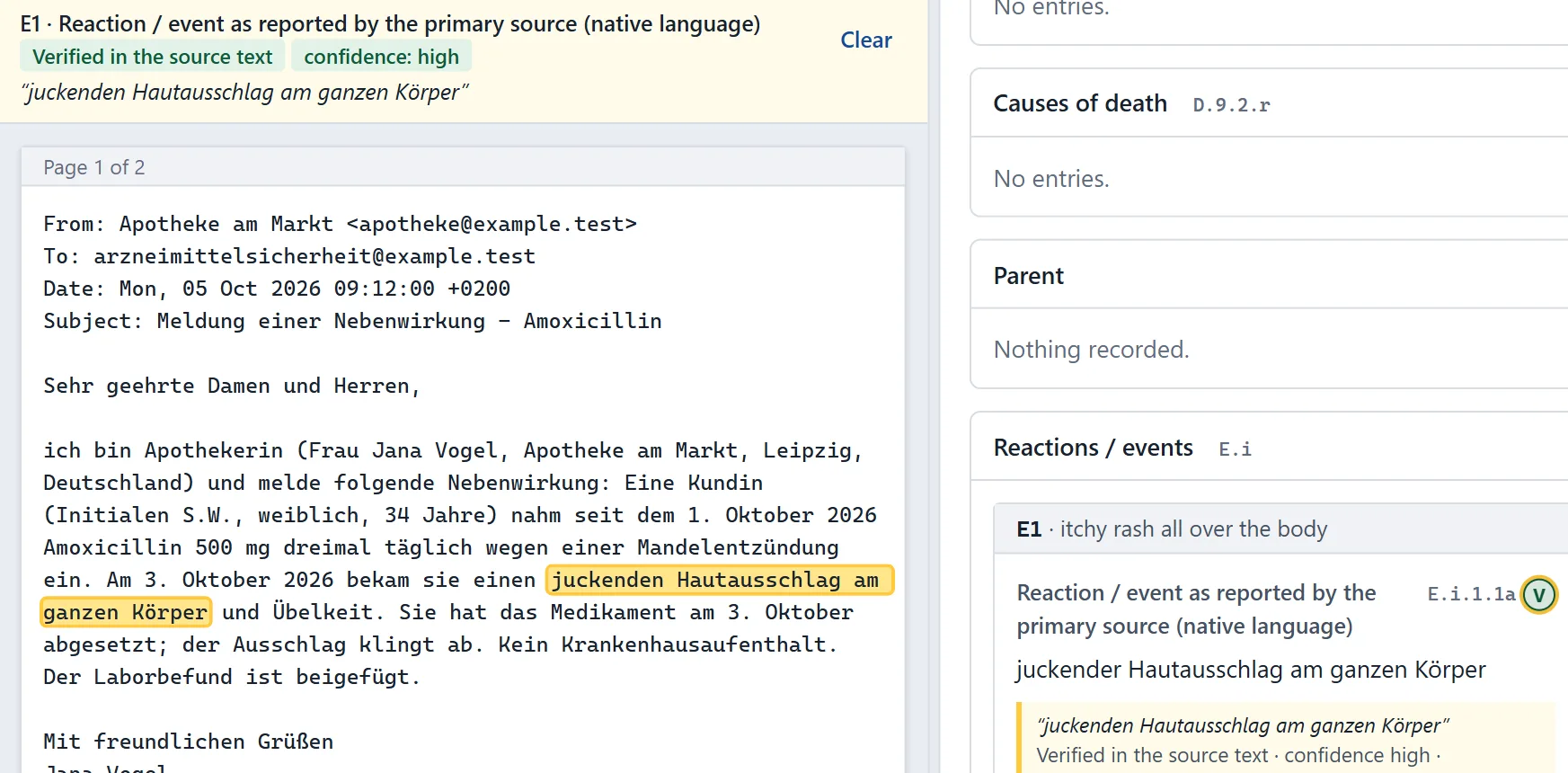
The document stays on screen next to the case. A marker on a value highlights the passage it was taken from, in the language it was written in, and states whether the software found that passage in the document.
When a passage cannot be found, or the source is a scan that can only be checked by eye, the value is flagged and the case goes to a person. The same applies to a narrative sentence that no field supports.
IntakeX Cloud
A reported reaction and the highlighted passage it came from (synthetic data).
Capabilities
What a safety team gets
Evidence for every value
A marker beside each value opens the passage it came from and says whether the passage was found in the document.
Your dictionaries, your versions
Each workspace loads its own licensed MedDRA and WHODrug releases and its event lists. Nothing is shared between customers.
Review on your terms
Always, conditionally or never: the review policy is a setting, and the signature statement is yours to word.
Any language, any script
Reports are read as written. Run through the full workflow so far: English, German, French, Spanish, Italian, Portuguese, Turkish, Greek, Russian, Arabic, Hebrew, Hindi, Thai, Chinese, Japanese, Korean.
Versions, not overwrites
Each change is a new version with author, time and reason. Two versions can be compared field by field.
Timelines from day zero
Priority and due date are set from the receipt date and your timelines, and overdue work is visible at a glance.
Routing rules
Say once which cases go to which authority or partner. The rules are versioned and audit-trailed like everything else.
An API for everything
Whatever the screens do, the API does. Machine accounts authenticate with client credentials and see one workspace only.
A new customer in minutes
IntakeX Cloud is multi-tenant. A customer, affiliate or business unit is a workspace: its own users, settings, dictionaries, destinations and audit trail. Creating one takes a name, a short name and an administrator, and no new infrastructure.
1The operator creates the workspace; the administrator is invited by e-mail.
2The administrator invites users and assigns roles.
3The organisation loads its MedDRA and WHODrug releases.
4Sender details, destinations and routing rules are completed. Messages stay marked as test until the workspace is released.
Runs on AWS, with nothing to operate
The service is serverless end to end: no servers, containers or private networks to patch and size. It scales with the number of cases and costs little when idle. One environment is one deployment in one AWS region of your choice.
AWS Lambda
Step Functions
API Gateway
DynamoDB
Amazon S3
Amazon Cognito
AWS KMS
CloudFront and WAF
Amazon Bedrock
Data is encrypted with keys in AWS KMS, each workspace is isolated by IAM as well as by the application, and the audit trail is anchored daily in storage that cannot be altered. Security and validation
Questions
What safety and IT teams ask first
Which document formats can IntakeX Cloud read?
PDF files, scans and photographs (including multi-page TIFF), Word and Excel files, e-mail files with their attachments, HTML, RTF, XML and plain text. A case can have up to 20 files, and text can also be pasted or sent through the API.
Which languages does it handle?
A report is read in the language it is written in; the reporter's words are kept and an English wording is added for coding. We have run reports in 16 languages through the full workflow, among them Japanese, Chinese, Korean, Arabic, Hebrew, Hindi, Thai and Russian. That shows a language works; accuracy on your own material is something a pilot measures.
Do we need our own MedDRA and WHODrug licences?
Yes. Each workspace loads the releases its organisation has licensed, and codes are always read from those releases. Novixo does not supply dictionary content.
Does a person review every case?
That is your decision. The review policy can require a signature on every case, only on cases that meet a trigger (serious, low confidence, uncoded terms, a possible duplicate and others), or on none. Whatever the policy, a case with a blocking E2B(R3) finding, an unsupported narrative sentence or a value that could not be confirmed in the source stops for a person.
Which AI model is used, and can it invent data?
The steps that use a model call Anthropic Claude through Amazon Bedrock, inside the AWS account that runs the service. Model output is treated as a proposal: values are validated against the case model, quoted passages are checked against the document, codes are read from the dictionaries, and the message is validated before anything is sent. The model and the version of every instruction are recorded with each call.
How long does it take to add a new customer or affiliate?
A workspace is created in about a minute from the operator screen: a name, a short name and the first administrator. No infrastructure is created. The administrator then invites users, loads the dictionaries and completes the sender details and destinations.
Is IntakeX Cloud validated?
A computerised system is validated by the company that uses it, for its intended use. We supply the documents that work needs: validation plan, user requirements, functional specification, risk assessment, traceability matrix, IQ, OQ and PQ protocols, and assessments against 21 CFR Part 11, EU Annex 11 and the HIPAA Security Rule. We also publish, to customers, the list of what is not implemented or not yet verified.
How does it connect to our safety database?
The approved E2B(R3) message is delivered over HTTPS, as a file hand-over through Amazon S3, or over SFTP and AS2 through AWS Transfer Family, and acknowledgements are tracked. The connection to a particular safety database or gateway is configured and tested with you during a pilot.
Bring a report of your own
The quickest way to judge IntakeX Cloud is to watch it work on the kind of document your team receives. Send us an anonymised example, or let us show you with ours.